
Email Marketing
Published:
Email Marketing
Qasim Farooq
Share
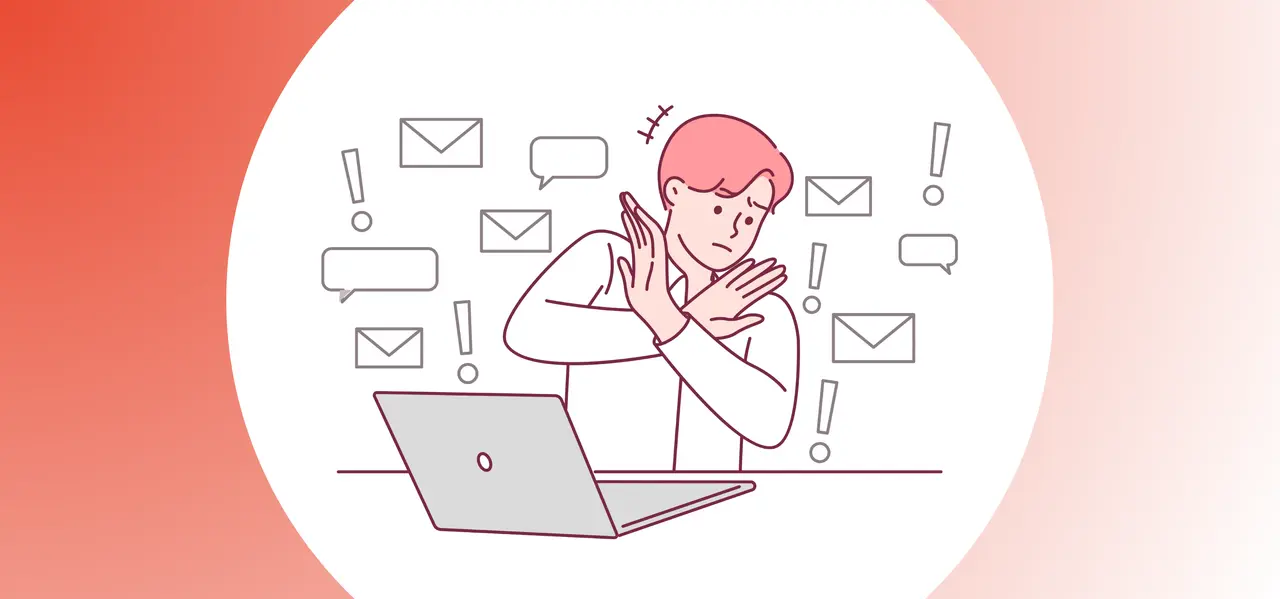
You write the perfect email. You tweak the subject line, polish the message, double-check every word. You hit send, feeling good—then nothing. No opens. No clicks. Just silence.
Is your audience ignoring you, or did your email never make it to their inbox in the first place?
Spam filters have become stricter in 2025, and they’re flagging more than just obvious scams. Even innocent words like “free,” “limited offer,” or “get paid” can quietly bury your message in the spam folder. One small slip, and all your effort disappears before anyone even sees it.
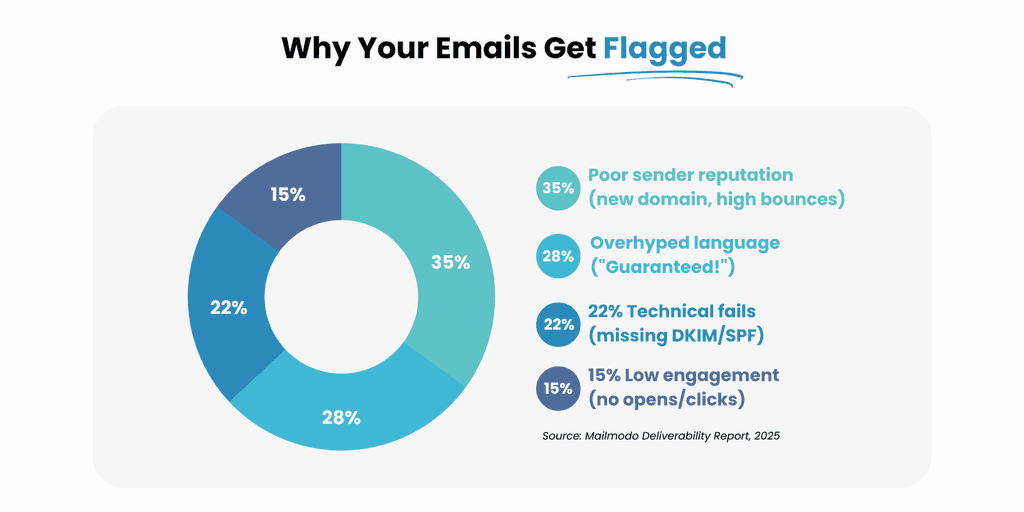
Mailmodo found that just a handful of flagged terms can increase the chance of getting filtered out by over 20 percent.
In this post, you’ll get a breakdown of the words that could be killing your deliverability, plus simple ways to clean up your copy and a tool that helps keep every email out of the danger zone.
Do Spam Words Still Matter in 2025?
Yes. But not in the way most people think.
Back in the early days of email, filters operated on rigid rules. If you used “free trial” or “buy now,” your message got flagged. Simple as that. That’s not how it works anymore.
Spam filters in 2025 are smarter. They operate on machine learning models that look at patterns, not just individual words. That means a word like “limited time” isn’t always the problem—it’s how it’s used, where it’s placed, and what surrounds it.
Still, certain words raise suspicion faster than others. Especially when combined with weak sender behavior.
For example:
A new sender domain plus “get paid today” in the subject line = high risk.
A cold email using “100% guaranteed” with no footer info = likely filtered.
A promotional blast with a subject line like “Claim Your Gift Now!!!” = probably gone.
Words matter most in context. And while filters won't block you just for saying “exclusive offer,” stacking a bunch of hyped-up language without proof or value makes the algorithm lean toward caution. Especially if recipients aren’t engaging.
The bottom line? Words still trip filters. But now, they’re scored based on behavioral data, email history, and reader interaction, not just blacklists. So yes—they still matter. Just not in isolation.
Why Emails Get Flagged as Spam
It’s not just about what you write. It’s about how your email acts—before, during, and after delivery.
Here’s what modern spam filters actually track:
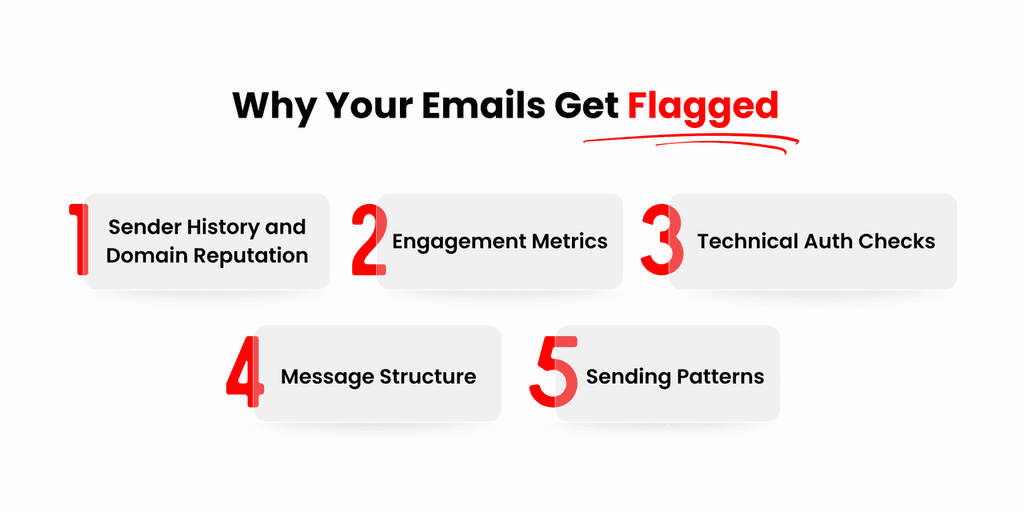
1. Sender History and Domain Reputation
Your sending domain has a fingerprint. Filters track bounce rates, open rates, complaints, and more.
If your past campaigns had low engagement or high unsubscribes, your current message starts off at a disadvantage.
New domains with no warm-up? You’re immediately suspicious.
2. Engagement Metrics
If recipients delete without opening, mark as spam, or don’t click—filters learn.
ESPs like Gmail now use individual engagement scoring, meaning if one user keeps ignoring your emails, future ones may get auto-routed to their spam—even if others receive them fine.
3. Technical Auth Checks
SPF, DKIM, and DMARC aren’t optional anymore.
If your email fails one of these checks, it doesn’t matter what words you use. Your message is getting blocked or quarantined.
4. Message Structure
Spammy design triggers include: one big image with no text, multiple mismatched fonts, and image-to-text ratios over 70%.
Filters expect a plain-text version too. Skipping it? Red flag.
5. Sending Patterns
Spiking from 100 emails to 10,000 overnight? Looks like a bot.
Sending a blast at an unusual hour for your list? Filters notice.
Using multiple “From” addresses without consistent domain identity? Also a problem.
So yes, content matters. But your email’s behavioral fingerprint tells filters far more than just what you say.
This is why two marketers can send nearly identical emails, and only one reaches the inbox.
Words (and Mistakes) That Can Land You in the Spam Folder
The Overhyped Pitch – Promotions That Go Too Far
Spam filters are trained on massive datasets, including billions of emails that recipients have marked as spam. Guess what language shows up over and over?
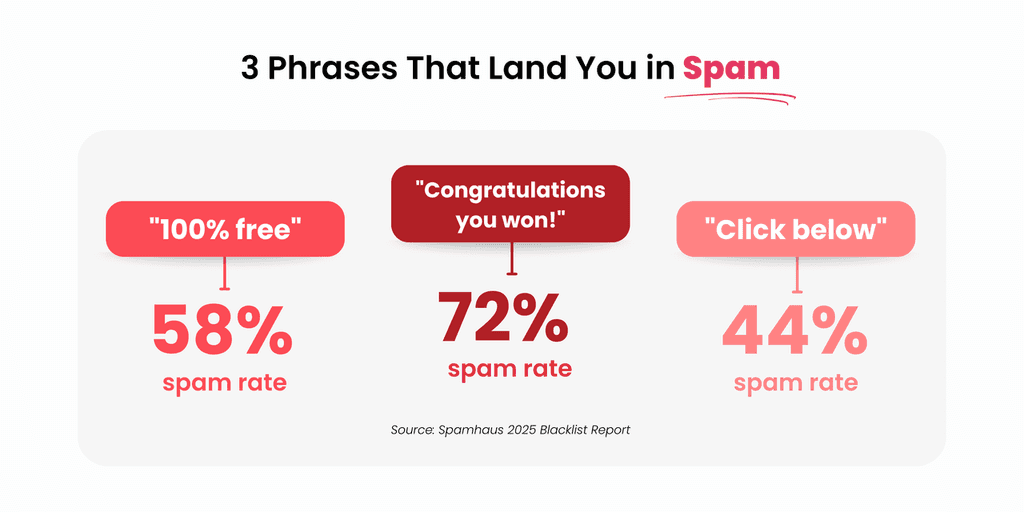
Words and phrases like:
“Double your income”
“Get rich quick”
“Act now or miss out”
“Zero cost to you”
“Lowest price guaranteed”
What do they all have in common?
They overpromise.
They sound like scams.
They lack specifics.
In 2025, filters don’t just flag phrases—they flag probability of deception. That’s how “Make money fast” gets you clipped, even if your offer is legit.
Worse? When those phrases appear in the subject line or above the fold of your email. The higher up they are, the heavier the penalty.
Fix it:
Use proof-based claims, specificity, and qualifiers.
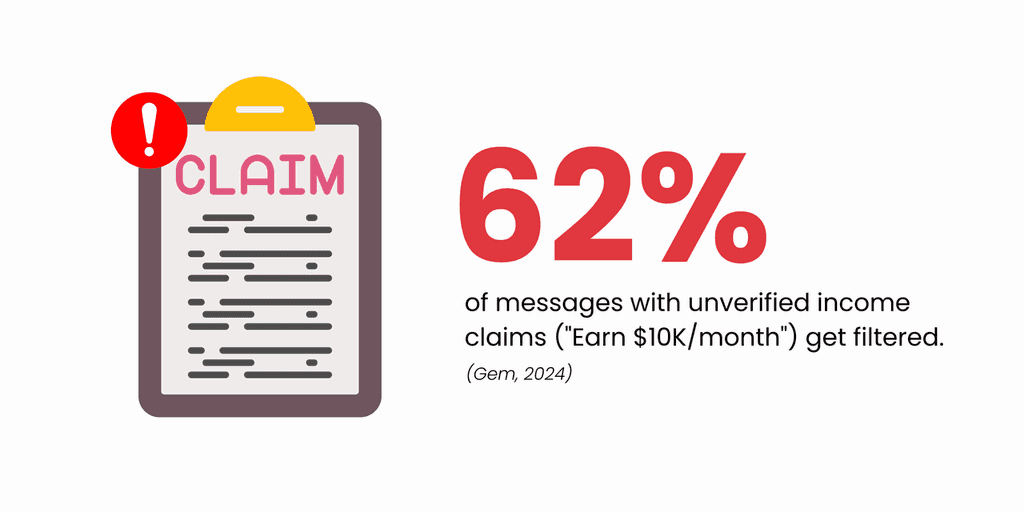
Bad: “Earn $10K a month with zero effort”
Better: “How 4 freelancers landed $2K projects after switching platforms”
Also, balance promotional language with contextual value. If your entire email is just a push, filters (and readers) tune out, which is especially important in email marketing in a world with 8-second attention spans.
Weird Symbols, Strange Numbers – And Why Filters Hate Them
You’ve probably seen it:
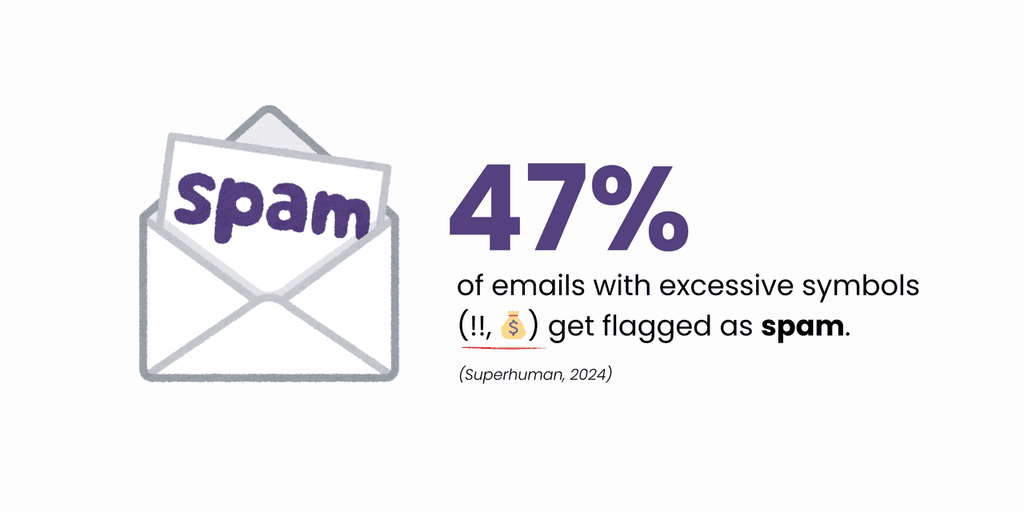
Subject lines that look like “M4ke M0ney N0w!!! 💸💸💸”
This isn’t creative. It’s a flashing red light to modern filters.
In 2025, ESPs use natural language processing to check if your content reads like normal human speech. These tricks break that flow, which signals low-quality or machine-generated content.
Here’s what trips filters immediately:
Substituting letters with numbers or symbols (L00k H3re! C@sh N0w!)
Multiple exclamation marks anywhere in the subject or body
Overuse of emojis—especially more than two per message
Strange font colors (neon green, red, bright yellow)
Using CAPS LOCK to emphasize urgency
These tricks originated as filter evasion tactics, and filters now see them as intent to deceive. Even one or two of these can lower your deliverability score.
Fix it:
Write like a human, not a clickbait bot.
Use proper punctuation. One exclamation point is fine—three is not.
Avoid overdecorating your subject line with symbols. They don’t increase clicks. They increase risk.
Financial Promises That Feel Like Scams
Spam filters are trained to spot the same tricks used in phishing scams and online scams—and “get rich quick” promises are at the top of that list.
Phrases like:
“Earn $5,000 fast”
“Double your income today”
“Make money from home with zero investment”
“Guaranteed profits overnight”
These aren’t just overused. They’re red flags for filters because they match the language in fraudulent messages, phishing emails, and fake websites that trick people into giving away their bank account info or credit card details.
Even legitimate marketers fall into this trap by copying aggressive wording they’ve seen elsewhere. But filters don’t care if your offer is real. If your message looks like a phishing attempt or voice phishing script, it won’t make it to the inbox.
These phrases are especially dangerous when paired with:
No clear sender identity
No physical address or company logo
Suspicious formatting (bolded promises, colored fonts)
Claims like “no risk” or “100% safe”
How to stay clear:
Be specific and verifiable. Instead of “Earn $10,000,” say “Here’s how one freelancer used our tool to land four $2,500 clients in 60 days.” That’s proof. It’s a story. And it won’t be flagged as a phishing scam.
Also avoid phrases like “zero investment.” Even if true, they match too closely with messages used in text message scams, paypal scam emails, and other fake offers promising massive rewards for no effort.
Also read: Can Email Images Put You in Spam?
Creating False Urgency
“Act now!”
“Limited spots available!”
“This offer expires in 10 minutes!”
You’ve seen these before—and so have spam filters. In fact, this kind of language often shows up in spear phishing campaigns and malicious emails designed to create panic, urgency, and quick reactions without critical thought.
And that’s the problem.
Urgency, when done right, nudges readers toward action. But when it’s forced or clearly fake, it feels like manipulation. Worse, filters associate it with phishing attacks that tell users their account information is at risk, or that they need to verify login details immediately.
That’s why phrases like:
“Immediate action required”
“Urgent account update”
“Verify your account now”
“Click now before it’s gone”
can sink your deliverability, especially if your sender domain is new or you’re linking to unfamiliar URLs.
This also applies to generic greetings like “Dear user” paired with urgency—classic signs of fake emails or phishing emails.
Better approach:
Urgency is fine when grounded in truth. Instead of “Only 10 minutes left,” say, “Our spring sale ends at midnight—last chance to grab 30% off.” It sets a clear timeline and avoids panic language. It also mirrors how legitimate companies communicate deadlines—calm, clear, and honest.
Misleading or Clickbait Language
“You won’t believe this one trick…”
“Doctors hate her for this…”
“This simple hack will change your life…”
These kinds of lines don’t just scream clickbait—they also mimic the tone of malicious websites, fake login pages, and spam messages crafted to lure people into clicking shady links.
Modern spam filters recognize these phrases because they’ve been used so often in malware delivery attempts and email phishing templates. They exploit curiosity and exaggeration, which leads to distrust from both filters and readers.
And no, putting a legitimate offer behind the subject line doesn’t help. If the email example starts with deception, filters will penalize it—especially if it includes sketchy redirects, fake testimonials, or overpromised results.
Another common trap: combining misleading hooks with suspicious formatting. For example:
“This one weird trick to lose 10 lbs in a week!!!”
“How to make $1,000 a day working from your couch”
“Click here for a surprise”
Pair these with a fake login prompt or a malicious software download, and you’re deep in identity theft territory. Even if your content is real, it will get treated as suspicious because of the pattern.
Smarter tactic:
Lead with clarity, not curiosity bait. Say what’s inside the email—whether that’s a strategy, offer, or tool—and keep your subject line rooted in value. “5 tactics brands use to boost click-through rates” is specific, grounded, and trustworthy.
Clickbait erodes trust. If filters don’t get you, your audience will.
CAPS LOCK and !!!! – Please Chill
If your email reads like you're yelling at your reader, don’t be surprised when it gets flagged—or flat-out ignored.
Using all caps in subject lines or body content is one of the oldest spam filter triggers. Throw in a few exclamation points, and now your message looks a lot like those old-school spam emails offering "AMAZING DEALS!!!" or shouting about "FREE MONEY!!!!"
Here’s why this matters in 2025:
Spam filters use natural language models to determine if a message sounds human. When your formatting looks like it came from a shouting bot—or a phishing email—it’s treated as high risk. This applies not just to subject lines but to headers, CTAs, and even footers.
Formatting red flags that trigger spam filters:
SUBJECT LINES IN ALL CAPS
Multiple exclamation points (!!!) or question marks (???)
Unusual punctuation combinations (like “Get rich NOW!!!!”)
Excessive bold, underlining, or color changes to highlight urgency
These tactics are often used in phishing scams, scam emails, and malicious messages to distract readers from looking too closely at the actual content—especially when paired with fake login pages or links to malicious websites.
What to do instead:
Use formatting to guide, not overwhelm. Stick to sentence case in subject lines. One exclamation mark, if truly earned, is fine. Bold text works when used sparingly to highlight value—not hype.
If your email looks like a fake message or reads like it was written in a rush by scammers, it won’t survive modern filters.
Health Claims and Miracle Cures
This one’s a minefield.
If you’re in health, wellness, supplements, or skincare, you’re already under tight scrutiny. And in 2025, email providers are filtering harder than ever for health-related misinformation and miracle cure claims.
Phrases like:
“Cure your back pain in 7 days”
“Reverse aging naturally”
“No more meds forever”
“Burn fat while you sleep”
These may sound compelling, but they flag multiple spam signals:
Too-good-to-be-true health claims
High-risk industry category
Language patterns seen in fraudulent health emails
Why does this happen? Because these claims often show up in phishing attempts, malicious emails, or fake websites selling counterfeit products. They’ve also been used in campaigns that tried to install malware through links disguised as free trials or downloadable guides.
Even legitimate brands fall into this trap when they overpromise without data. Filters don’t check if your supplement is FDA-approved. They check if your phrasing matches patterns from phishing attacks and fraudulent messages.
How to stay safe:
Avoid absolutes (“cure,” “permanently,” “instantly”).
Use soft qualifiers like “can help support” or “may improve.”
Link only to verified pages with proper disclaimers and a clear company logo.
Also, never mix medical claims with aggressive sales language. “Buy now to eliminate chronic pain” is a fast route to the spam folder—even if it’s true.
Too Good to Be True
If your email sounds like a dream come true, filters are going to treat it like a lie.
Let’s be real—offers like:
“Make $1,000 a day from home”
“Lose 15 pounds in one week without exercise”
“Get a brand-new iPhone for free”
“No work, no problem, just cash”
These are the backbone of common spam emails, online scams, and phishing scams. Even if your offer is real, filters are trained to block these because they’ve appeared in thousands of phishing emails, fake login pages, and scam websites trying to collect personal information, account details, or credit card numbers.
These lines also mimic the tone used in:
Fake job postings
Paypal scam emails
Text messages asking for account verification
And once a filter sees that tone—combined with other factors like a high image-to-text ratio or missing contact details—it’s game over.
How to rewrite without getting flagged:
Trade exaggeration for specificity. “Make $500 a week as a side hustle” sounds more credible than “Quit your job and get rich.”
Show proof. Case studies, testimonials, or numbers that reflect real outcomes make your message more trustworthy.
Add disclaimers or eligibility conditions to avoid the “blanket promise” trap.
Even a strong offer loses power when it sounds like every other phishing scam. Trust gets you opens. Hype gets you filtered.
The “We Respect Your Privacy” Problem
It sounds reassuring on the surface. But phrases like “We respect your privacy” have become a classic marker of phishing emails and fraudulent messages—especially when they’re used to distract from suspicious links or shady asks.
Filters don’t block the phrase by default. They flag how it’s used.
If it’s paired with vague disclaimers, no clear sender identity, or links to fake websites, it’s viewed as part of a phishing attempt.
This phrase is often used in emails trying to trick people into sharing personal information, login details, or even bank account credentials—all under the guise of security.
Red flags include:
Generic greetings like “Dear Customer” followed by a vague privacy promise
Hidden links that redirect to malicious websites
Footers that mention privacy but offer no real contact info or company verification
What to do instead:
Build trust by actually protecting sensitive information. Use a real company name and logo. Include a direct, working link to a full privacy policy hosted on a legitimate company website. Skip the fluff, and give people something real.
When privacy language is used as a smokescreen—filters and readers both notice.
Job Offers, Work-From-Home, and Employment Triggers
Looking to promote a job opportunity or remote role? Be careful. Employment-related spam is one of the most common types of phishing scams on the internet today.
Phrases like:
“Get paid weekly from home”
“Start immediately—no experience needed”
“Flexible job, instant approval”
“Work just 2 hours a day and earn big”
These sound familiar because they’ve flooded inboxes for years. They’re often used in scam emails and malicious messages designed to steal personal details, login information, or even install malware.
This language shows up in:
Voice phishing messages asking job seekers to confirm account information
Fake emails pretending to be from hiring managers at legitimate companies
Phony job boards linked to malicious websites or infected downloads
Even well-meaning brands get caught if they’re careless with phrasing. Especially when emails lack a real company logo, clear contact details, or use broad claims like “no background check.”
How to avoid this:
Be specific. Include job title, expected duties, and contact info tied to a real domain.
Never ask for sensitive data or bank details over email.
Avoid “too easy” phrasing that resembles online scams—it hurts both your credibility and deliverability.
Shady Language That Suggests Something Illegal
Even if your email isn’t promoting anything sketchy, the wrong wording can make it look like it is.
Spam filters are trained to spot terms tied to suspicious activity, including:
“Confidential deal”
“Untraceable”
“This stays between us”
“No questions asked”
“Secure your funds”
These lines are often used in phishing attacks and spear phishing campaigns—especially ones trying to steal credit card numbers, bank account access, or other sensitive data. Some are also tied to malicious software downloads or requests for unusual payments.
Even indirect phrases like “limited-time wire option” or “anonymous transaction” can raise flags.
Worse, they’re often mixed with shady formatting—think all caps, missing punctuation, or weird attachments.
What to do:
Ditch secrecy in your messaging. The more open and transparent your language is, the more credible it feels.
Avoid offering “workarounds” or benefits that sound like fraudulent behavior.
Keep calls to action simple, and avoid phrases that could double as instructions in a phishing scam.
Looking clean on the surface won’t save your email if the copy sounds like it’s hiding something.
Sloppy Writing: Spelling and Grammar Still Count
It’s still one of the fastest ways to lose trust—and get flagged.
Poor spelling, weird grammar, and inconsistent sentence structure are signs of carelessness. But in email, they also mimic the tone and writing style of scam emails, fake messages, and low-effort phishing emails.
Examples that trigger filters and readers alike:
Misspellings like “verfy your acount” or “login immediatley”
Mixed tense or broken English that suggests it wasn’t written by a native speaker
Repetitive errors in basic account information like dates or names
Sloppy structure that looks like it came from an auto-translator or bot
Filters treat this as a red flag. Not because they care about grammar—they care about patterns of abuse. And sloppy writing is everywhere in phishing scams, text messages from scammers, and malicious emails trying to trick users into handing over sensitive data.
How to clean it up:
Proofread twice. Use a tool like Grammarly, but don’t stop there.
Have someone else on your team review every important email campaign.
Read it out loud—does it sound like a real person, or a scammer in a rush?
Bad grammar signals low quality. In email, it also signals danger.
you might like: Why Are My Emails Going In Spam? Top Reasons
A Tool That Handles the Heavy Lifting (So You Don’t Have To)
Clean copy isn't enough. If your sender domain looks new, your message feels cold, or you trigger a suspicious email filter—you're toast.
That's where GoCustomer comes in.
It's built to handle email deliverability, personalization, and targeting—without you needing to second-guess every subject line.
1. Deliverability That Holds Up
GoCustomer takes care of the behind-the-scenes work. It warms up your domain, spaces your sends based on behavior, and avoids patterns that cause other users to mark emails as spam. This matters when sending to people who’ve already fallen victim to phishing scams, or when filters are hypersensitive to new domains.
It also helps you avoid triggers that resemble social engineering tactics, so your message doesn’t look like a scam even when your intent is legit.
2. Real Data Enrichment with Smart Agents
Personalization only works when your data is solid. GoCustomer uses agents like the LinkedIn Agent and Website Agent to enrich every contact with up-to-date info—like role changes, company activity, or mentions across social media.
This context helps you avoid generic greetings, prevent tone-deaf pitches, and steer clear of content that might resemble a phishing attempt.
It also keeps you from asking for the wrong thing at the wrong time—like personal information or sensitive data—which often lands you in spam, even unintentionally.
3. Workflow Builder That Keeps You Clean
GoCustomer’s drag-and-drop workflow builder lets you build entire campaigns that react in real time—no clunky tools or messy logic.
You can:
Set paths based on opens, clicks, or replies
Avoid repeat sends that make people feel like they receive spam
Adjust timing for industries like delivery services, where engagement windows are narrow
It helps you stay relevant, respectful, and in the inbox.
Plus, with smart warnings baked in, you’ll avoid terms that the Federal Trade Commission, ISPs, and spam filters flag as risky—before they cost you your reach.
Final Thoughts – Keep Your Emails Out of Trouble
It doesn’t take much to land in the spam folder anymore. One wrong phrase, a misleading subject line, or a poorly timed follow-up can make your message look like the common spam emails filters are trained to block.
And the line between a clean campaign and a suspicious email is thinner than ever.
With cyber criminals using tactics that mimic real email marketing, even legitimate companies can get caught in the crossfire. One mention of a shady deal or a misleading link to Google Docs, and suddenly your message looks like it came from one of those fraudulent websites trying to send spam at scale.
But now you’ve got a clear picture of what gets flagged—and how to avoid it.
Stick to honest copy. Avoid spammy shortcuts. Use smart platforms like GoCustomer to personalize at scale and stay out of trouble.
Because getting into the inbox isn’t just about writing well—it’s about staying real.

Reach more customers with your cold emails
Table of Contents
In a nutshell
Phishing attacks in 2025 have evolved to include AI-generated emails that mimic human writing styles, deepfake audio messages impersonating trusted individuals, and multi-channel approaches combining email, SMS, and social media. Staying vigilant and educating users about these sophisticated tactics is crucial for protection.
Email delivery refers to the successful transmission of an email to the recipient's server, regardless of where it lands (inbox, spam, etc.). Email deliverability, on the other hand, measures the likelihood of your email reaching the recipient's primary inbox. High deliverability indicates effective email practices and a good sender reputation.
Yes, several tools can help assess your email's likelihood of being marked as spam:
Mail Tester: Provides a spam score and suggestions for improvement.
GlockApps: Offers inbox placement tests across various email providers.
SpamAssassin: An open-source tool that analyzes email content for spam characteristics.
Personalized emails tend to have higher engagement rates, which can positively influence deliverability. However, excessive or irrelevant personalization can appear suspicious to spam filters. It's important to ensure that personalization adds genuine value to the recipient.
If your domain is blacklisted:
Identify the blacklist your domain is on using tools like MXToolbox.
Determine the cause, such as spam complaints or security breaches.
Rectify the issue, which may involve improving email practices or securing your systems.
Request removal from the blacklist by following the specific procedures of the listing organization.
Subscribe to our Newsletter!
Digital advice costs money but we send it to
your inbox for free.
Related Blogs
Time is Money, and We're About to Save You Both!
Book a quick demo of our email marketing tools and watch as we transform your leads into loyal customers.
![A loop illustration w-auto h-[70px]](/_next/image?url=%2F_next%2Fstatic%2Fmedia%2Fvector1.7738e6de.png&w=256&q=75 "GoCustomer Platform Image")
Get in touch
Subscribe to our weekly Newsletter and receive updates via email.