

Email Marketing
Published:
Email Marketing
Qasim Farooq
Share
When it comes to email marketing, the right template size can make or break your campaign. Proper dimensions aren’t just about aesthetics—they’re key to ensuring your emails look great, load quickly, and deliver an exceptional user experience across devices.
According to a Litmus survey, 60% of brands use email templates to design their campaigns, highlighting the importance of getting these details right.
Whether you’re a beginner building your first campaign or a seasoned marketer fine-tuning your strategy, this guide will walk you through the essentials.
From standard widths to optimizing images, headers, CTAs, and more, you’ll learn the tips, examples, and best practices needed to create high-performing email templates that stand out in any inbox.
Let’s get started!
Understanding Standard Email Dimensions
Creating emails that look good and function well requires sticking to tried-and-true size guidelines. Standard dimensions help ensure your emails are readable, responsive, and visually appealing on any device.
Whether you're designing for desktop or mobile, these sizes provide a reliable starting point for layouts, images, and other elements.
Below is a handy table that breaks down the ideal and maximum sizes for key components of your email design:
Element | Ideal Size | Maximum Size |
Template Width | 600–640 px (desktop) | 800 px (desktop) |
Template Height | 1500 px | 3000 px |
Header (Height) | 70 px | 200 px |
Content Blocks (Height) | 800 px | 1200 px |
Footer Size (Height) | 100 px | 300 px |
Email Banner | 600×730 px | 700×1730 px |
CTA Button | Depends on the campaign | Depends on the campaign |
Image | 600×650 px (varies) | Depends on the campaign |
GIF | 500 KB | 1 MB |
Email File Size | 75 KB | 102 KB |
Use these guidelines as your blueprint to ensure your emails maintain a professional look and perform well in all inboxes.
Breaking Down the Ideal Email Sizes
To create visually appealing, high-performing emails, getting the dimensions right is essential. Each component of your email design—from width to file size—plays a role in delivering a seamless experience for your audience.
Let’s dive into the key elements of email sizing and learn how to perfect each one.
Width: Finding the Perfect Fit
The template width determines how well your email message displays on different devices, including desktop screens and mobile screens.
A standard width of 600 pixels is considered the default for most email clients and offers reliable compatibility.
Desktop Recommendations: The ideal email template width for desktop screens is between 600 px and 640 px, allowing your content to look polished on email editors and email service providers.
Mobile Screens: For mobile devices, aim for a width of 320 px for vertical orientation. While the maximum width for horizontal layouts is 480 px, users may find it inconvenient to rotate their phones, affecting user's perception of your email marketing campaign.
If your design requires a full width layout or background colors, extensive testing using email preview tools is crucial to ensure proper rendering on all desktop and mobile devices.
By doing so, you can create responsive emails that look great everywhere.
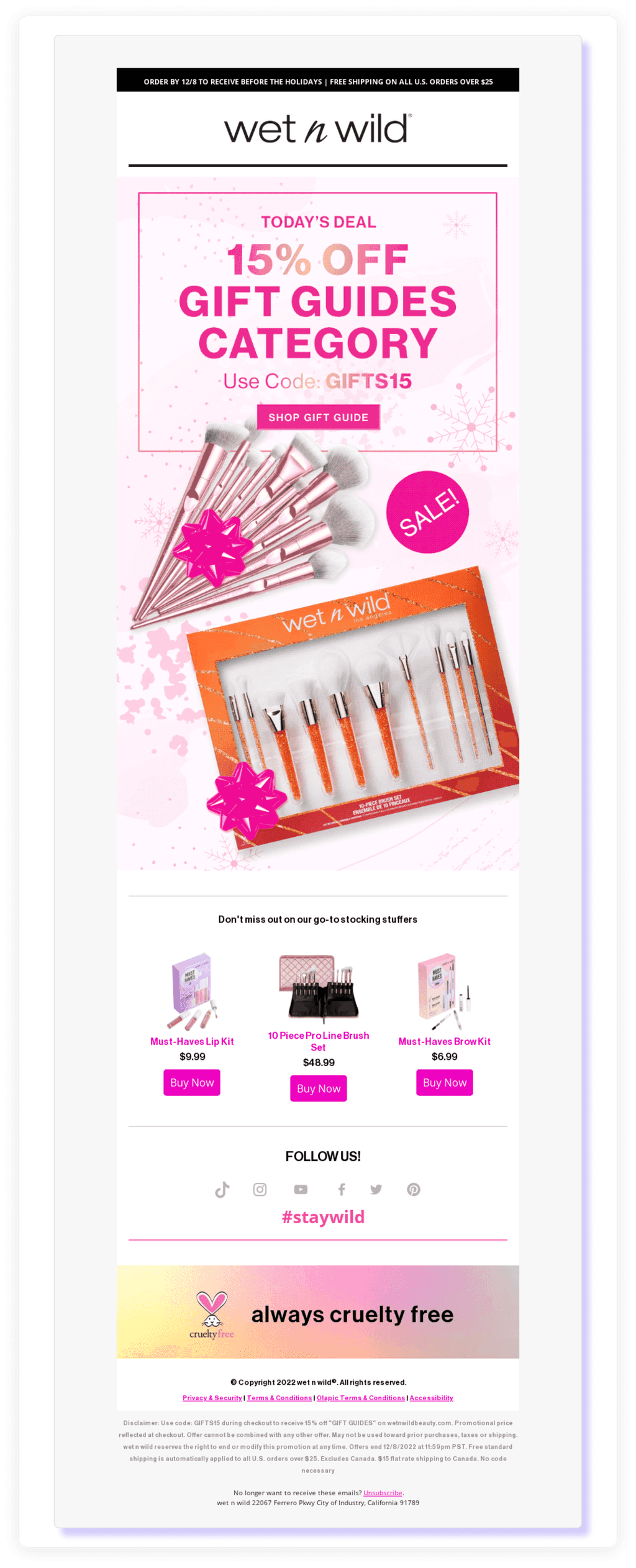
The email below from Wet n Wild has a width of 610 pixels, a typical size for standard newsletters.
Height: Balancing Length and Scannability
The template height offers more flexibility compared to width, but keeping it practical is key to avoiding reader fatigue.
Ideal Height: An email template height of 1500 px is often enough for most marketing emails, balancing the need for content with important details. For longer emails, such as transactional emails or newsletters, heights of up to 3000 px may be necessary, but only if content is well-organized into clear content blocks.
Above the Fold: Place critical elements like the subject line, email header, and call to action (CTA) within the top 300-500 pixels. This ensures users see your valuable information before scrolling.
Content Organization: Use concise paragraphs, background colors, and visual elements like images or font size adjustments to make long emails more scannable. Properly sized image sizes also contribute to better readability.
For emails with extensive marketing material, maintaining clarity with proper screen resolutions and content block segmentation is essential to hold the reader's attention.
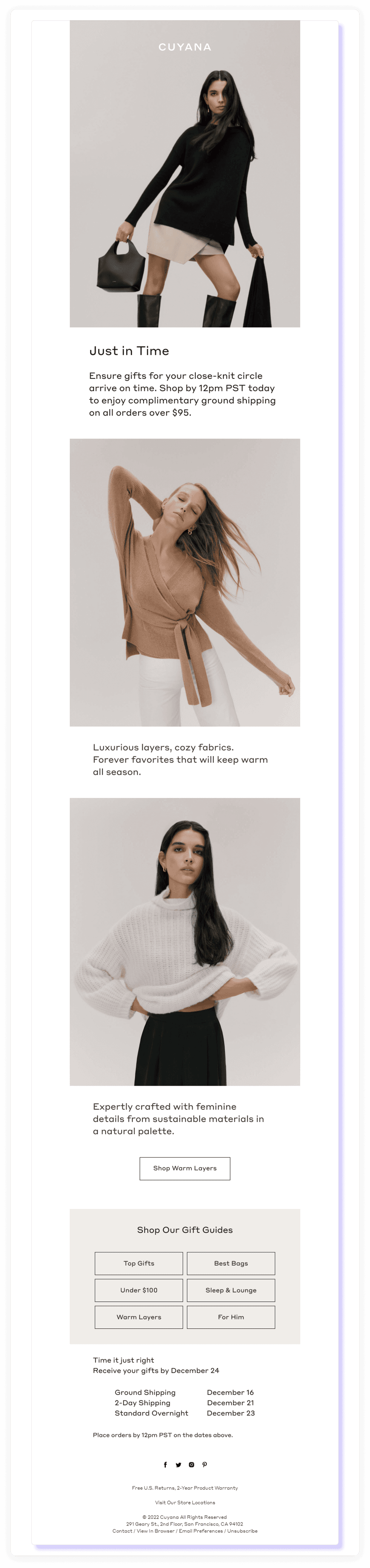
Here's a newsletter from Cuyana. Despite its height being nearly 4000 pixels, the clear block structure makes it easy to read.
File Weight: Keeping Emails Light and Fast
The email size plays a huge role in how quickly it loads, particularly for recipients on slower networks or mobile devices. Keeping your file size manageable improves the overall experience and avoids potential clipping by email services like Gmail.
Target Size: A file weight under 75 KB is ideal for quick loading. For media-heavy email campaigns, you can push the limit to 102 KB, but avoid large attachments or overly dense html code.
Optimization Tips: Compress image sizes and limit the use of heavy campaign images or animated GIFs. This ensures your emails remain light while including necessary legal details, such as unsubscribe links or your company address.
Minimalist Design: Consider focusing on the most important aspects of your email marketing content. Reducing unnecessary other visual elements ensures a clean, responsive email design.
By managing your template size effectively, you can create engaging email marketing campaigns that are both fast-loading and visually appealing, regardless of screen size or email client.
According to MailCharts, this Cartier email is 52.74 KB in size, while its images collectively weigh 3.53 MB.

Essential Dimensions and Tips for Every Email Element
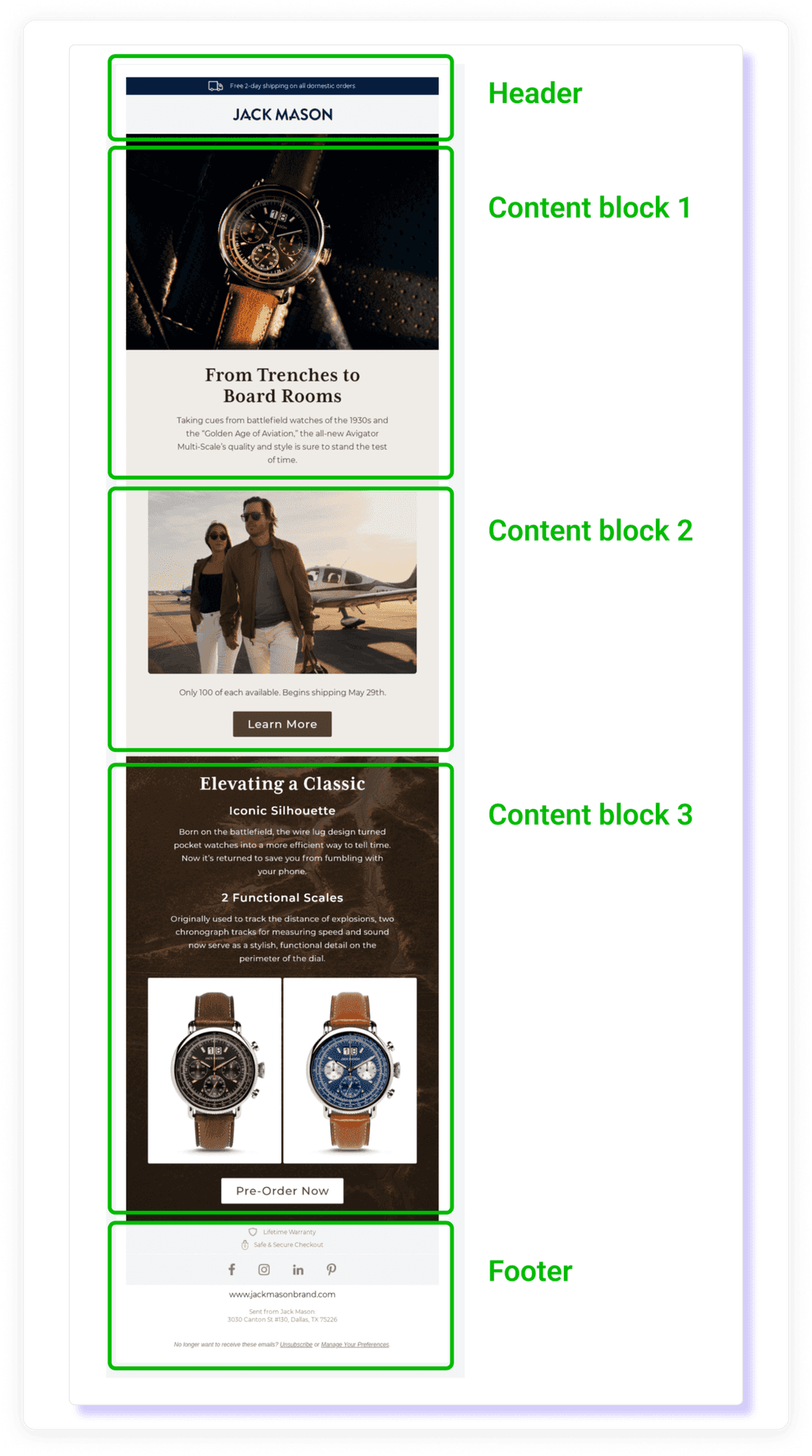
When crafting an email, each element plays a role in creating a seamless and engaging experience. From the preview text to the footer design, every detail matters.
Here’s a breakdown of essential dimensions and tips for key email components.
Preview Text: Crafting the Perfect Sneak Peek
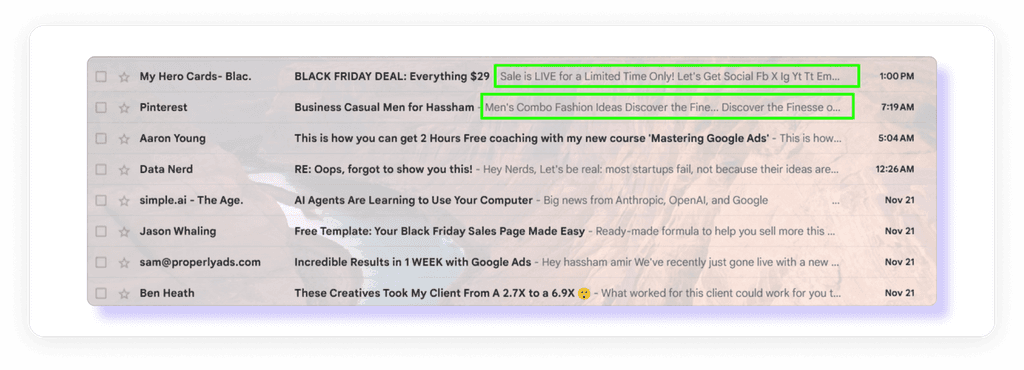
Your preview text is the first thing recipients notice alongside the subject line. A well-crafted sneak peek can entice readers to open your email.
Ideal Length: Keep it between 40–90 characters to ensure it displays correctly across email clients like Gmail or Yahoo Mail.
Pro Tip: Use the preview text to complement the subject line, adding extra context or creating curiosity. Avoid duplicating the same content.
Test and Adjust: Use email preview tools to see how the text appears in various email service providers to avoid truncation.
Header Dimensions: Making a Strong First Impression
Your email header is prime real estate for grabbing attention and setting the tone of your message.
Recommended Height: Aim for a header height of 70–200px. This size works well for both desktop and mobile devices, ensuring a balanced and professional look.
Key Elements: Include your company logo, brand colors, and any important details like navigation links or a tagline.
Visual Tips: Use contrasting background colors to make your header stand out. Avoid clutter and keep the design aligned with your brand's email template dimensions.
The header in the Columbia email below, measuring 146 pixels in height, stands out with its bold deep gray color.

Content Block Sizes: Organizing Your Message
The content blocks form the core of your email, organizing information in a way that’s easy to read and engaging.
Ideal Heights: Keep each content block within 800–1200px. Breaking content into smaller sections improves flow and readability.
Formatting Tips: Use clear headings, bullet points, and visual elements like icons or dividers to separate sections. This helps guide readers through your message.
Responsive Design: Test how your content blocks render on desktop and mobile devices, adjusting template size for each platform to ensure consistency.
Here’s a breakdown of the content blocks in this Herb & Olive email:

The email consists of five content blocks. The first block has a height of roughly 47.8 pixels, while the remaining blocks vary between 400 and 450 pixels.
Altogether, the combined height of these blocks, excluding padding, is approximately 1733.8 pixels.
Also read: Empower Your Leads Strategy & Close More Deals with High-Converting Cold Email Templates
Footer Design: Ending with Impact
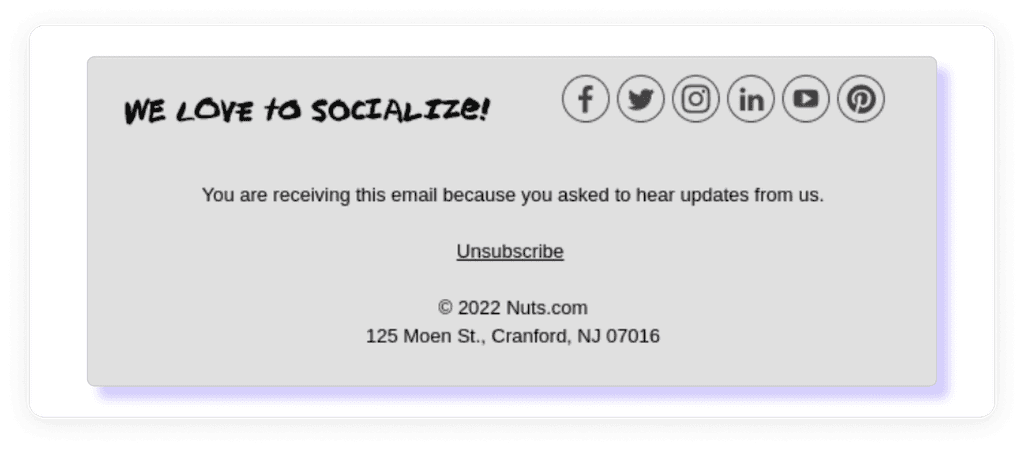
The email footer wraps up your message and includes essential legal details like unsubscribe links and your company address.
Ideal Height: Design footers to be 100–300px tall. This size ensures enough space for critical information without overwhelming the design.
Key Components:
Legal Details: Include your email signature, company address, and unsubscribe link.
Contact Information: Provide links to your website and social media profiles.
Visual Tips: Use small icons and concise text to maintain a clean layout. Consider background colors that contrast with the main body for clear separation.
Banner Dimensions: Eye-Catching Visuals That Work
Banners are a powerful way to grab attention, deliver key messages, or highlight a call to action (CTA) in your email template.
They’re typically placed at the top or bottom of an email and often include a combination of visuals, text, and clickable buttons.
Ideal Dimensions: A banner width of 600–700 px ensures consistency with the rest of your email template dimensions, while a height of 90–200 px works for concise designs. For mobile devices, banners should scale to a width of 320–385 px for optimal display.
Maximum Dimensions: For designs where the banner takes up more space, heights up to 1730 px can work, especially for minimalistic emails with focused messaging.
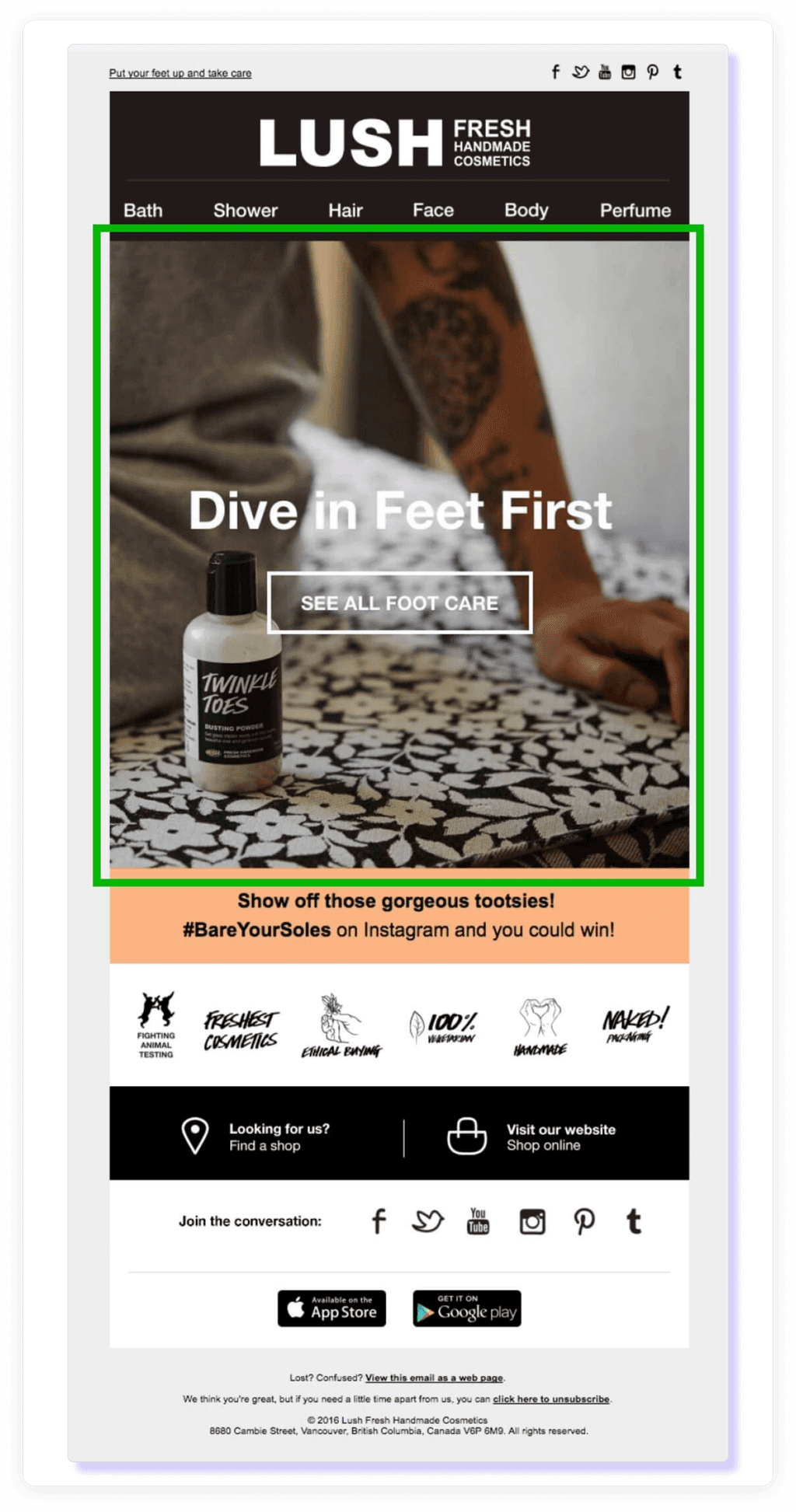
The Lush banner in the example above features an image with a slogan and a button, measuring 650 pixels in height.
While this is taller than the recommended size, it works well due to the email’s minimalist design, which includes only one narrow content block next to the banner.
Tips for Effective Banners:
Keep it Balanced: Ensure the banner aligns with your overall email width and doesn’t overpower other content blocks.
Optimize File Size: Compress image sizes to keep banners under 200 KB for faster load times on mobile screens and desktop screens.
Use Clear Messaging: Include a short, impactful slogan or tagline that aligns with your email marketing campaign, paired with a bold CTA button if applicable.
CTA Button Sizes: Driving Clicks with the Right Design

CTA buttons are essential for encouraging actions like making a purchase, signing up, or visiting a website.
Getting their size and placement right ensures they stand out without disrupting the overall flow of your email.
Recommended Sizes:
Desktop: Width of 200–300 px and height of 50–75 px for clarity and easy interaction.
Mobile Devices: CTA buttons should span the full width of the email, typically 320 px, to make them easily tappable on smaller screens.
Tips for Effective CTA Design:
Contrast Matters: Use bold, contrasting background colors that make your button pop while staying cohesive with your design.
Readable Text: Opt for clear, action-oriented phrases like "Shop Now" or "Learn More" in an easy-to-read font size.
Strategic Placement: Place CTAs in prominent content blocks or near relevant information, ensuring they’re visible without excessive scrolling.
Image and GIF Sizes: Maximizing Visual Appeal
Visuals like images and GIFs make your email marketing more engaging and can boost click-through rates when used effectively. However, oversized files can slow load times, negatively impacting performance.
Image Dimensions
Width: Between 600–800 px for clear display across email clients and devices.
File Size: Keep images under 200 KB to maintain fast loading speeds.
GIF Guidelines
File Size: Aim for 500 KB or less. If the GIF is larger, cap it at 1 MB to avoid excessive loading times.
Tips for Optimizing Visuals:
Compress Files: Use tools to reduce file size without sacrificing quality.
Test Across Platforms: Verify that images and GIFs display properly in various email clients, including Gmail and Yahoo Mail.
Strategic Use: Use visuals to break up long content blocks, highlight key points, or emphasize your call to action.
Conclusion
Email marketing is more than just pixels and templates—it’s your opportunity to connect with your audience in a way that stands out and delivers value. From mastering the perfect email template size to optimizing content blocks and visual elements, every detail plays a role in crafting emails that resonate and drive results.
But let’s face it—keeping up with dimensions, testing across every email service provider, and ensuring your designs are both functional and engaging can feel overwhelming.
That’s where GoCustomer comes in.
With GoCustomer, you don’t just create emails—you build connections. Our platform simplifies the process of designing responsive emails with the ideal email template size, offering pre-built templates and email recipes to save you time and effort.
Whether it’s compressing image sizes, setting up automated workflows, or personalizing your email marketing campaigns, GoCustomer equips you with the tools to succeed.
Plus, with robust analytics and performance tracking, you can refine your strategy and deliver campaigns that truly resonate.
Your emails aren’t just messages—they’re a representation of your brand.
With GoCustomer, you’ll have everything you need to create emails that not only perform but also leave a lasting impression.
Ready to transform your email marketing? Let GoCustomer help you craft emails that are impactful, efficient, and truly unforgettable.

Reach more customers with your cold emails
Table of Contents
In a nutshell
The go-to width for email templates is 600 pixels. This size ensures your emails display properly across a variety of email clients and devices, keeping them visually balanced and easy to read.
While there isn’t a strict rule for height, keeping your email between 1500 and 3000 pixels is a good practice. It provides enough space for your content without overwhelming readers with endless scrolling.
Use compressed images with a width of 600–800 pixels. This keeps your visuals clear and professional while maintaining quick loading times. Aim for image files under 200 KB whenever possible.
Gmail often clips emails that exceed 102 KB. Keep your content lean, optimize your HTML code, and focus on what matters most to avoid this issue.
Testing is critical. Use email preview tools to see how your template renders in popular clients like Gmail, Yahoo Mail, and Outlook. This ensures your design stays consistent across platforms and devices.

Subscribe to our Newsletter!
Digital advice costs money but we send it to
your inbox for free.
Related Blogs

Time is Money, and We're About to Save You Both!
Book a quick demo of our email marketing tools and watch as we transform your leads into loyal customers.

![A loop illustration w-auto h-[70px]](/_next/image?url=%2F_next%2Fstatic%2Fmedia%2Fvector1.7738e6de.png&w=256&q=75 "GoCustomer Platform Image")

Get in touch
Subscribe to our weekly Newsletter and receive updates via email.