

Email Marketing
Published:
Email Marketing
Qasim Farooq
Share
I can’t tell you how many times I’ve written an email, hit send, and then spent the next hour second-guessing every word.
Did I sound too blunt? Was my tone clear enough? Did I accidentally send the wrong impression? If you’ve ever been in that boat, you know exactly how much weight a simple email can carry.
Over the years, I’ve learned the hard way that email isn’t just about sharing information—it’s about managing relationships and perceptions.
I’ve seen how a poorly phrased message can derail a project, but I’ve also watched a thoughtful, well-crafted email turn a tense situation around. As digital communication has taken center stage, especially with remote work and global teams, mastering the art of email etiquette has become a skill we can’t afford to overlook.
So, why does this matter so much in 2025? Because emails aren’t just messages—they’re reflections of who we are and how we operate. Every line, every word, every choice we make in tone has the potential to strengthen connections or strain them.
In this blog, I’ll share the insights I’ve gained from years of trial and error, along with actionable tips to help you write emails that don’t just get read but leave the right impression. Let’s dive in—because if there’s one thing I’ve learned, it’s that the way you hit "send" can make all the difference.
Why Is Email Etiquette Crucial for Success?
Over the years, I’ve learned that how you write an email can make or break professional relationships. A well-written email shows respect for the recipient’s time, keeps things clear, and leaves no room for misinterpretation.
I’ve personally seen how small details, like using a good subject line or ensuring proper grammar, can build trust and strengthen connections.
On the other hand, I’ve also seen how poor email habits can hurt someone’s credibility. For example, I once worked with someone who consistently used vague subject lines and left out important details. It didn’t take long for others to start avoiding their emails altogether.
It might sound harsh, but when people feel like your emails waste their time or cause confusion, it reflects poorly on you.
That’s why I always double-check my emails for clarity, tone, and relevance before hitting "send." These small steps make a big difference in how you're perceived.
Email Etiquette: Then vs. Now
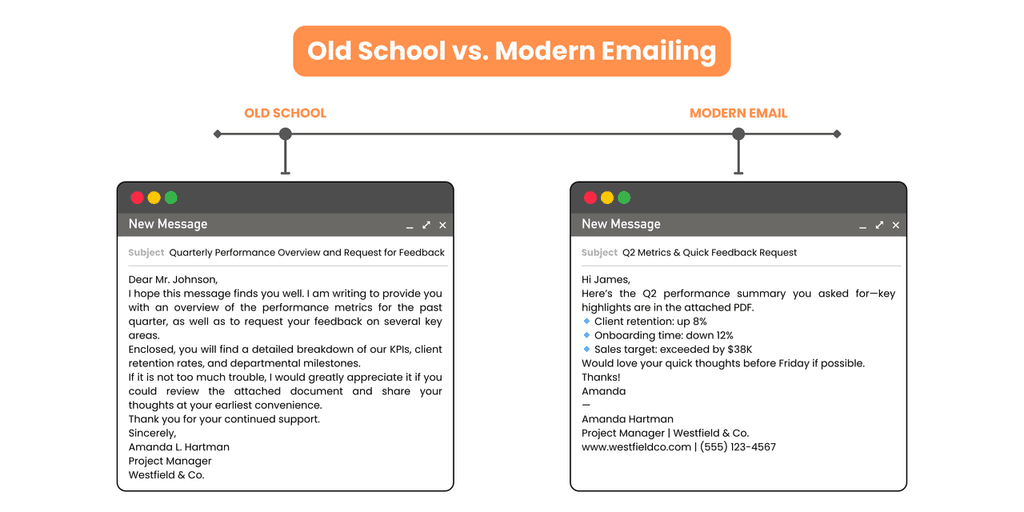
I still remember when emails were all about formality. Every message started with "Dear" and ended with "Sincerely." It worked back then because email was mostly for official communication. But things have changed.
Today, email is as much about efficiency as it is about tone. Depending on the situation, a formal greeting might still be appropriate, but casual openings like "Hi" are often better for quick, internal messages.
What I find most interesting is how tools and trends have reshaped email etiquette. Automation, email clients, and remote work have all changed the game.
Now, we’re not just expected to send an email—we’re expected to do it in a way that’s clear, professional, and adaptable to different people and cultures.
Greetings and Salutations
When it comes to starting an email, I’ve realized that the tone you set in the first line matters more than you think.
For instance, when I’m emailing a new client or someone in a senior position, I go with "Dear [Name]" or "Good morning." It’s polite and shows respect. But when I’m emailing my team or someone I work with regularly, "Hi [Name]" works just fine. It’s less formal but still professional.
What I try to avoid at all costs is skipping the greeting altogether. It feels cold and can make your email come across as rushed.
I also steer clear of overly casual phrases like "Hey" unless I’m absolutely sure it fits the context. Striking the right balance shows that you’re thoughtful about how you communicate.
The Role of Emojis
I used to think emojis didn’t belong in professional emails. But over time, I’ve realized they can be useful—when used carefully. For example, if I’m sending a quick update to my team, a simple thumbs-up emoji can convey positivity without needing extra words. But I’d never use emojis in a formal email to a client or when discussing something serious.
The key is knowing your audience. If I’m unsure whether an emoji is appropriate, I leave it out. And when I do use them, I make sure they add clarity or warmth to my message, not distract from it. Overusing emojis or using them in the wrong context can come across as unprofessional, so I always keep it subtle.
The One-Line Response
I’ll admit, I’ve been guilty of sending one-line responses like "Got it" or "Noted." They’re quick and easy, especially when you’re juggling multiple tasks.
But I’ve also learned that these responses can sometimes feel dismissive. For example, if someone sends a detailed email and all I reply with is "Okay," it might make them feel like I didn’t value their effort.
Now, I try to be more intentional. Instead of just saying "Noted," I’ll add something like, "Thanks for sending this over.
I’ll get started on it." It only takes a few extra seconds but shows that I’ve read their message and appreciate the time they put into it. Quick replies are fine when the context allows, but they shouldn’t come at the expense of clarity or respect.
10 Email Etiquette Rules You Need to Know
Email etiquette isn’t just about being polite—it’s about standing out, communicating with purpose, and ensuring every email you send builds your reputation.
Over time, I’ve picked up strategies that go beyond the basics, and these tips have helped me write emails that people actually look forward to reading.
Let’s dive into what works.
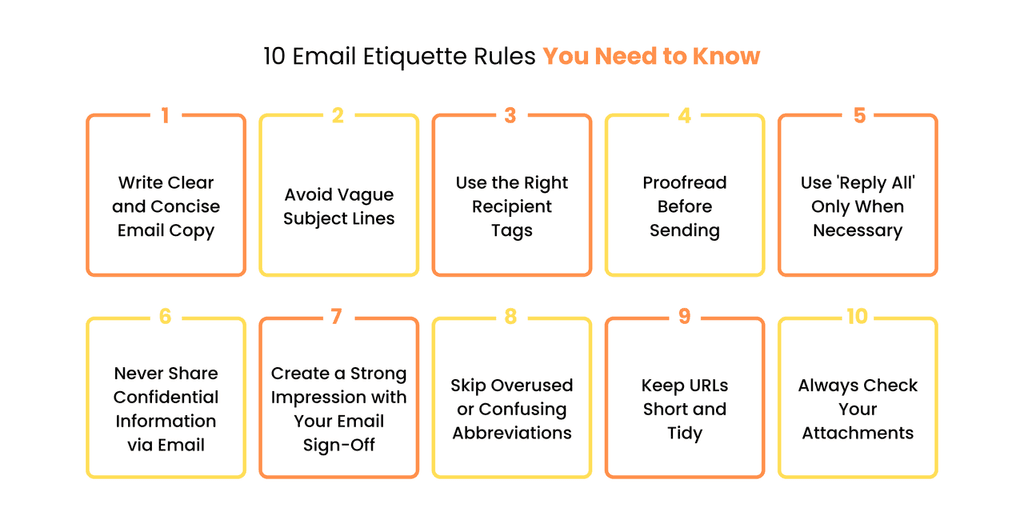
1. Write Clear and Concise Email Copy
Clarity and brevity don’t just save time—they help your emails stand out in crowded inboxes. Here’s what I’ve learned about crafting concise emails that get the job done without sacrificing quality:
Think like a headline writer: Start your email with a one-sentence summary of what the recipient needs to know. For example, instead of beginning with, “I’m writing to follow up on our previous conversation,” say, “Here’s the project timeline you requested.”
Layer your information: Use the inverted pyramid method—put the most critical information upfront, and save the details for later. This ensures even skim-readers get your main point.
Use formatting strategically: Highlight important information with bold text, but don’t overdo it. For example, if you’re listing deliverables, bold the deadlines so they stand out.
Add a TL;DR section: When sending longer emails, I’ve started including a “Too Long; Didn’t Read” (TL;DR) summary at the top to ensure the key points aren’t missed.
These small tweaks don’t just make your emails easier to read—they make them more actionable and appreciated.
2. Avoid Vague Subject Lines
Subject lines are prime real estate in an inbox. I’ve learned that a strong subject line isn’t just about being clear—it’s about grabbing attention and setting the stage for engagement. Here’s what’s worked for me:
Use numbers and specifics: Instead of “Quarterly Update,” try “Q1 Update: 3 Key Insights for the Team.” Numbers add structure and intrigue, making your email stand out.
Pose a question: Questions spark curiosity and make the recipient more likely to open your email. For example, “Are We Ready for the Monday Launch?” feels more engaging than “Launch Status.”
Tailor subject lines for mobile users: Most emails are opened on mobile devices. I keep subject lines under 40 characters when possible so they don’t get cut off.
A/B test for insights: When sending emails to larger groups, I’ve experimented with different subject lines to see which ones get better open rates. For example, “Exclusive Tips for Your Campaign” might perform better than “Marketing Update.”
Your subject line is the first impression—make it count by being precise, engaging, and relevant.
3. Use the Right Recipient Tags
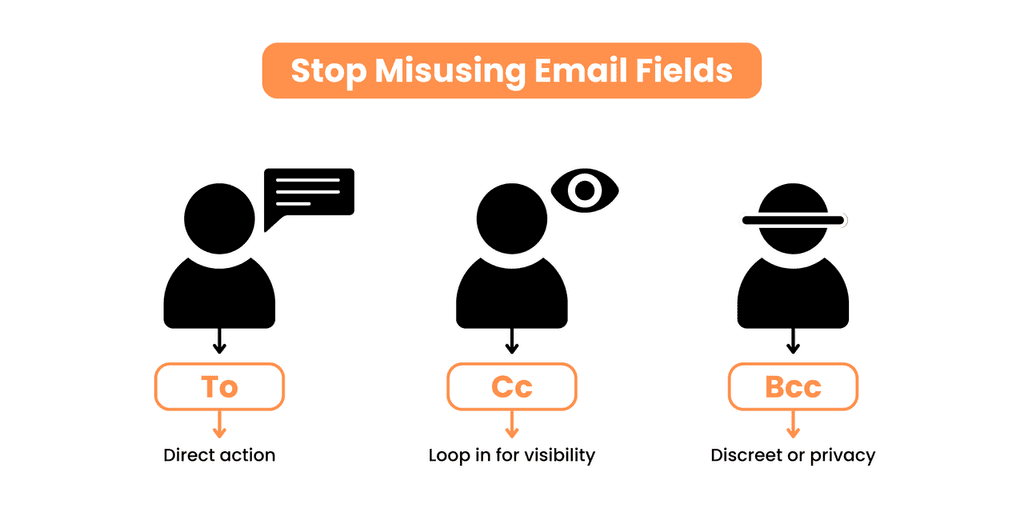
Misusing "To," "Cc," and "Bcc" can cause major headaches. I’ve seen situations where people were left out of the loop because they weren’t tagged correctly or where irrelevant recipients were accidentally copied. Here are some less obvious strategies for using these tags effectively:
Set expectations with "To": If you’re emailing multiple people, I call out the specific person responsible for action within the body of the email. For instance: “@John, please handle the budget review by Friday.”
Use "Cc" for transparency, not clutter: I use "Cc" for stakeholders who might need oversight but don’t need to reply. For example, I might "Cc" a manager when communicating directly with their team, keeping them informed without involving them directly.
Leverage "Bcc" tactically: Bcc can be a lifesaver for protecting recipient privacy in large distributions. But I also use it for one specific trick: when forwarding sensitive information, I “Bcc” myself to ensure I have a clean copy for my records.
Create distribution lists with rules: For recurring emails sent to large groups, I use email client tools to create pre-set distribution lists. This minimizes errors and ensures the right people are always included.
Getting these tags right isn’t just about avoiding missteps—it’s about managing communication flow and showing respect for everyone’s time.
4. Proofread Before Sending
Proofreading is the cornerstone of good email etiquette, and it’s a step I never skip.
A professional email riddled with spelling errors or vague subject lines not only looks careless but can also lead to misunderstandings.
Whether you’re communicating with a client, a colleague, or even your team, ensuring clarity and a professional tone is critical.
Here’s how I make sure my business emails are polished before I send them:
Double-check your email signature: Make sure your professional email signature includes your job title, company website, and contact information. A missing or outdated signature block can come across as unprofessional.
Check for grammatical errors and proper grammar: Tools like Grammarly are great for catching standard spelling issues, but I always do a final read myself to ensure the tone is appropriate.
Verify relevant information: Whether it’s a subject line or a crucial attachment, confirm that your email remains accurate and complete before sending.
Look for the wrong context: Sometimes, forwarding emails without checking the chain can reveal sensitive or irrelevant details. Always verify the content fits the recipient’s needs.
Proofreading ensures your emails are polished and professional, allowing recipients to understand and respond in a timely manner without confusion or delays.
5. Use 'Reply All' Only When Necessary
Email chains can quickly spiral into chaos when "Reply All" is misused. I’ve learned that overloading inboxes with unnecessary responses can frustrate recipients and waste time.
Good email etiquette means knowing when to hit "Reply All" and when to keep the conversation focused.
Here are a few strategies I’ve found effective:
Use “To” for action, “Cc” for awareness: If someone is listed in the “To” field, they’re expected to take action or respond. Those in the “Cc” field are there to stay informed but not necessarily reply. Misusing these tags is one of the most common mistakes I’ve seen.
Be selective about recipients: Before sending, I always ask, “Does everyone on this list need to see my response?” If the answer is no, I adjust the recipients accordingly.
Include clear subject lines: When replying to a long thread, I adjust the subject line to reflect the latest update. This helps recipients quickly identify the email’s purpose.
When replying to a long thread, always check if your response is relevant to the entire group or if it would be better directed to the original sender to avoid email overload. Thoughtful use of "Reply All" fosters strong relationships by respecting everyone’s time and reducing unnecessary email clutter.
6. Never Share Confidential Information via Email
One of the most important rules of email etiquette is protecting confidential information. I’ve seen how easily business email chains can fall into the wrong hands—whether through careless forwarding or unsecured communication channels.
Sharing sensitive data via email puts both you and your company at risk.
Here’s how I handle confidential communication:
Use secure alternatives: When sharing sensitive files, I rely on encrypted platforms or file-sharing tools instead of attachments in an email. Email clients often lack the security needed for this type of information.
Avoid including sensitive details in subject lines: Clear subject lines are great, but they should never include confidential information.
Pick up the phone for sensitive matters: When in doubt, I opt for phone calls or text messages to discuss private details. It’s faster, and there’s no digital trail that could be accessed by the wrong person.
Avoid using personal emails for business communication, especially when sharing sensitive or confidential information Protecting sensitive information is not just about avoiding common mistakes—it’s about maintaining trust and ensuring your professional communication meets the highest standards.
7. Create a Strong Impression with Your Email Sign-Off
Your email sign-off is the last thing your recipient sees, so it’s your final chance to leave a positive and professional impression. Over the years, I’ve realized that a thoughtful sign-off can make your email more memorable and set the right tone for future communication.
Here’s how I approach email sign-offs:
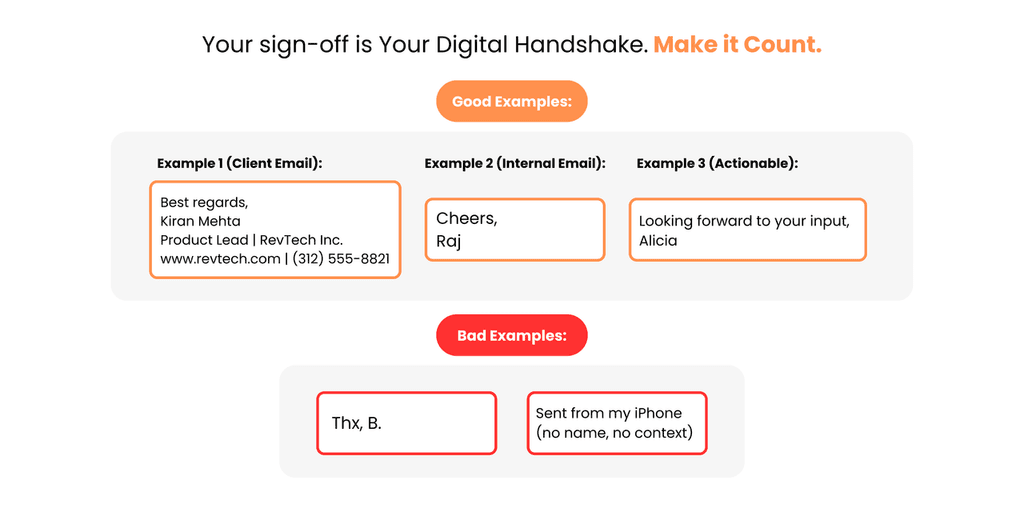
Stick to professional closings: Phrases like "Best regards," "Sincerely," or "Kind regards" work well for most situations. Avoid overly casual options like "Cheers" unless you’re sure it fits the relationship.
Include a signature block: A professional email signature should have your full name, job title, company website, and contact information. A clean, well-designed signature block helps reinforce your professionalism.
End with a call to action (when needed): If your email requires a response, I’ll add a polite nudge at the end, like "Looking forward to hearing from you" or "Let me know if you need more details."
An effective email sign-off isn’t just about politeness—it’s about leaving your recipient with a clear sense of who you are and what’s expected next.
You might like: Funny Salutations for Emails: Adding Humor to Your Sign-Offs Without Losing Professionalism
8. Skip Overused or Confusing Abbreviations
I’ve lost count of how many times I’ve had to Google an abbreviation in an email because it wasn’t clear. While acronyms might save you a few seconds when typing, they can confuse your recipient and lead to unnecessary follow-ups.
Good email etiquette means prioritizing clarity over speed.
Here’s what I’ve learned:
Avoid uncommon abbreviations: Stick to widely recognized ones like "FYI" or "ASAP." For everything else, write it out—especially if your recipient might not be familiar with the terms.
Define acronyms when first used: If you need to use a term like "KPI" or "ROI," spell it out the first time: "Key Performance Indicator (KPI)." This ensures everyone is on the same page.
Consider your audience: When emailing someone outside your field or company, avoid jargon altogether. For example, instead of "ETA," write "expected time of arrival."
Skipping unnecessary abbreviations makes your emails easier to read and prevents miscommunication.
9. Keep URLs Short and Tidy
Long, messy URLs can make your email look cluttered and unprofessional. I’ve learned that hyperlinking is a simple yet powerful way to clean up your emails and keep your message focused.
Here’s how I manage URLs effectively:
Use hyperlinks: Instead of pasting a long URL, link it to an appropriate phrase. For example, "View the full report" is more polished than including a raw URL like www.company.com/report12345.
Double-check the links: I always test hyperlinks before sending an email to ensure they lead to the correct destination.
Provide context: Even with a hyperlink, let the recipient know what they’re clicking. For example, "Check out our updated pricing details" is more informative than "Click here."
Clean URLs make your emails easier to read and convey professionalism, especially in business email communication.
10. Always Check Your Attachments
Few things are more embarrassing than sending an email and realizing you forgot to include the promised attachment.
It’s one of the most common mistakes, and I’ve made it enough times to build a habit of always double-checking.
Here’s what I do:
Attach files before writing: I add attachments before drafting the email so I don’t forget later. Many email clients now warn you if you mention "attached" but forget to include a file, so I always pay attention to those prompts.
Avoid large files: When files are too large, I upload them to a secure cloud platform like Google Drive or Dropbox and share a link instead. This keeps emails manageable and avoids issues with email servers rejecting large attachments.
Taking these extra steps ensures your attachments don’t just make it into the email—they also provide value to the recipient.
A Smarter Way to Communicate Professionally
Email etiquette isn’t just a set of rules—it’s a skill that can transform how you communicate, build relationships, and grow your professional reputation.
From crafting clear subject lines to ensuring your email sign-offs leave a strong impression, mastering these practices will not only improve your communication but also help you stand out in an increasingly crowded digital space.
That said, one of the biggest challenges professionals face today is scaling personalization while maintaining good email etiquette.
Writing a hyper-personalized email for one recipient is manageable, but doing it at scale—without losing professionalism—can feel almost impossible.
This is where platforms like GoCustomer step in to bridge the gap.
GoCustomer’s AI-powered platform takes email personalization to the next level. For example, its LinkedIn Agent allows you to gather data like a recipient’s recent activity, job history, or professional achievements, making it easier to tailor each email without spending hours on research.
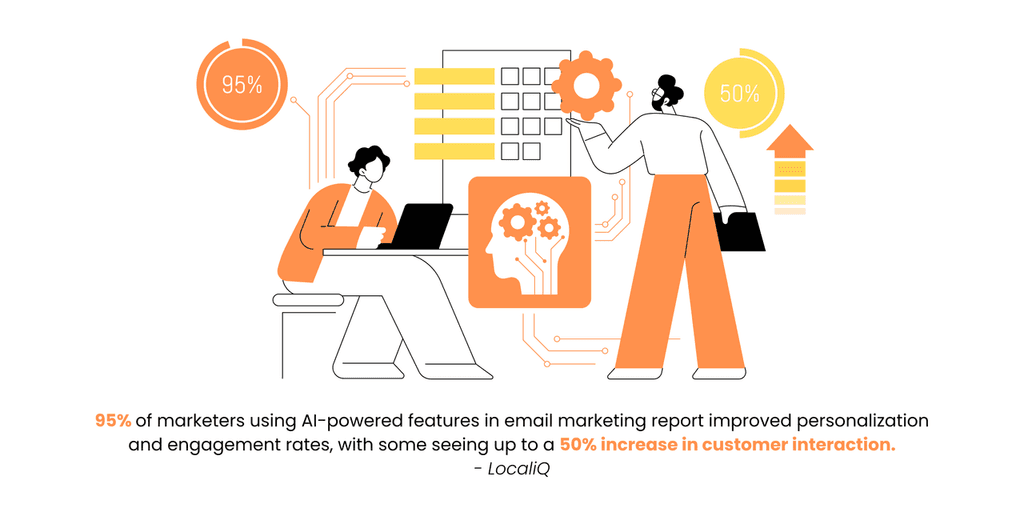
By automating data enrichment and offering tools for hyper-personalized messaging, GoCustomer helps you craft emails that feel thoughtful and relevant—even when you’re managing outreach on a large scale.
What’s more, GoCustomer combines this hyper personalization with robust features like domain warm-up and drip campaigns, ensuring your emails don’t just get sent—they get seen.
It’s a smart solution for anyone who wants to maintain strong relationships through email while scaling their efforts effectively.
By pairing these email etiquette tips with platforms like GoCustomer, you’ll be well-equipped to navigate the complexities of modern communication, whether you’re reaching out to a single contact or engaging with hundreds.
The result? Professional, impactful, and meaningful connections that stand the test of time.
Remember: every email you send is an opportunity to leave a lasting impression. Make it count.

Reach more customers with your cold emails
Table of Contents
In a nutshell
Reserve the 'High Priority' setting for truly urgent matters that require immediate attention. Overusing this feature can lead to recipients ignoring your emails or perceiving you as inconsiderate. Use it sparingly to maintain its effectiveness.
Recalling an email is possible in some email clients, like Microsoft Outlook, but it only works if the recipient hasn't opened the email yet and is using the same email system. Even then, there's no guarantee the recall will be successful. It's best to double-check your emails before sending to avoid the need for a recall.
When emailing international colleagues, be mindful of cultural differences. Use clear and simple language, avoid idioms or colloquialisms, and be aware of time zones when expecting prompt responses. It's also courteous to include international dialing codes in your contact information.
If you're included in an email chain that's not relevant to you, it's appropriate to reply to the sender privately, thanking them for including you and politely requesting to be removed from future correspondence on that particular topic. This helps keep everyone's inbox uncluttered.
If you haven't received a response after a reasonable period, it's acceptable to send a polite follow-up email. Restate your original message or request, express understanding for their busy schedule, and kindly ask for an update when convenient.
Subscribe to our Newsletter!
Digital advice costs money but we send it to
your inbox for free.
Related Blogs
Time is Money, and We're About to Save You Both!
Book a quick demo of our email marketing tools and watch as we transform your leads into loyal customers.
![A loop illustration w-auto h-[70px]](/_next/image?url=%2F_next%2Fstatic%2Fmedia%2Fvector1.7738e6de.png&w=256&q=75 "GoCustomer Platform Image")

Get in touch
Subscribe to our weekly Newsletter and receive updates via email.