

Email Marketing
Published:
Email Marketing
Qasim Farooq
Share
I Learned the Hard Way That My Email Marketing Metrics Were a Lie—Here’s How You Can Avoid the Same Trap
I remember the moment vividly. I logged into my email marketing dashboard and saw a massive spike in my click-through rate. At first, I thought, This is it! The campaign is finally taking off. More people were clicking my links than ever before. But then reality hit—those “engaged” users weren’t converting. No sign-ups, no purchases, nothing.
It didn’t take long to figure out what was happening. My emails were being clicked… but not by actual humans. Instead, spam filters and security bots were “checking” my links before real subscribers even had a chance.
And just like that, my engagement metrics—everything I relied on to track performance—were completely skewed.
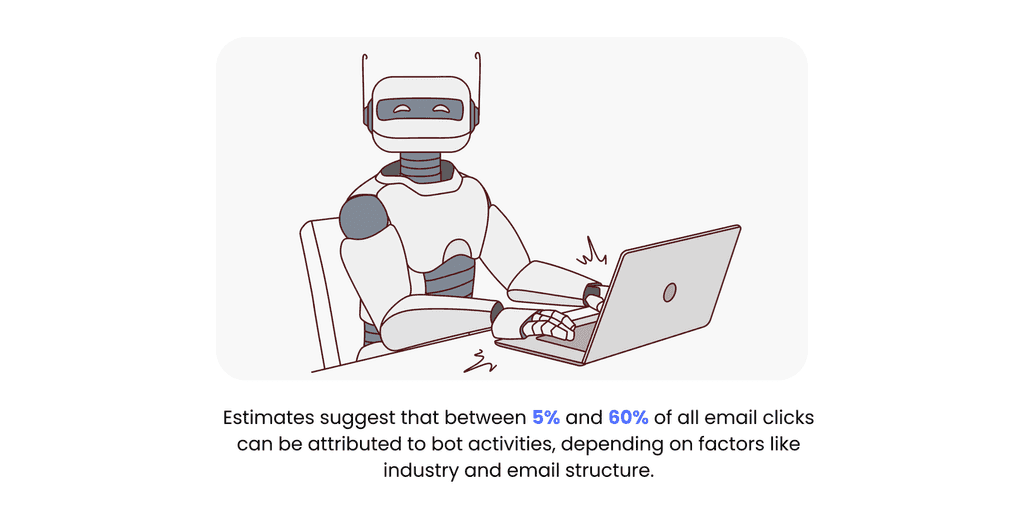
If you’re running email campaigns, there’s a good chance this is happening to you too. Studies estimate that up to 40% of email clicks come from bots, not real users.
That means your data might be lying to you. And if you’re making marketing decisions based on those numbers—optimizing campaigns, retargeting, or even reporting success—you could be wasting time and money chasing ghost engagement.
The good news? There’s a way to detect, prevent, and fix bot clicks before they wreck your email marketing strategy.
In this post, I’ll break down what’s really happening, how to spot the warning signs, and what steps you can take to protect your data.
Let’s get into it—because no one likes being misled, especially by their own analytics.
Email Bot Clicks—What They Are and Why They’re Wreaking Havoc on Your Metrics
I used to think high email engagement meant success—until I realized bots were inflating my numbers. If you’ve ever had a campaign with sky-high clicks but zero conversions, you’ve probably fallen into the same trap.
The Real Difference Between Human Clicks and Bot Activity
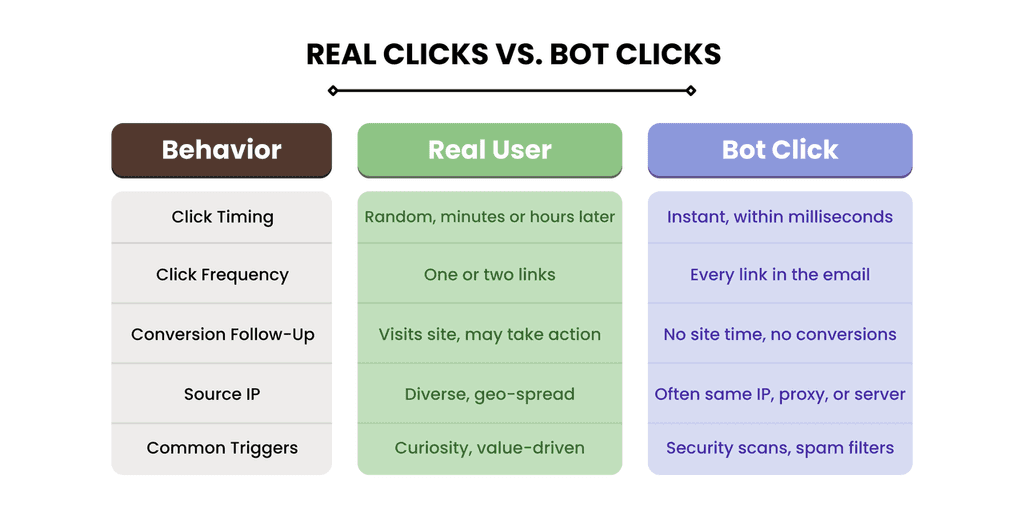
Not all clicks are equal. Real users engage with intent—they open, read, and click when something interests them. Bots and security filters, on the other hand, behave differently:
Humans click selectively, at different times, and take action.
Bots click instantly, hit every link, and never convert.
If your click-through rate looks amazing but your revenue doesn’t match up, fake clicks could be messing with your data.
Why Security Filters and Spam Checkers Are Fueling Fake Engagement
Security tools are designed to protect users, but some go overboard. They pre-click every link before an email even reaches the inbox, checking for phishing scams. Sounds helpful, right? Except it completely skews your analytics and makes it seem like people are engaging when they’re not.
Some major offenders include:
Corporate IT security software scanning company emails.
Anti-phishing tools clicking links before real users do.
Overactive spam filters triggering fake engagement.
And the worst part? Most marketers don’t even realize it’s happening.
Why Email Marketers Can’t Afford to Ignore Bot Clicks and Opens
If bot clicks were just a minor annoyance, we could ignore them. But they’re actively wrecking email performance, misleading automation, and damaging sender reputation.
Wrecked CTR and Conversion Data
Bot clicks inflate your numbers but don’t translate to real engagement.
Your click-through rate looks great, but your conversions stay flat.
Retargeting campaigns waste money on ghost leads.
A/B test results become unreliable because bots skew the data.
Fake engagement leads to bad marketing decisions.
The Automation Nightmare: When Bots Trigger Sequences
Ever had a lead click your email and immediately get thrown into a follow-up sequence? It might not have been a lead at all.
Bots trigger automation workflows, making campaigns go haywire.
Lead scoring gets messy—fake clicks make bad leads look valuable.
Sales teams waste time chasing ghost engagement.
If your automations feel off, bot clicks could be the culprit.
Deliverability and Reputation Risks
Email providers don’t care if clicks come from bots or humans—if engagement looks suspicious, your sender reputation suffers.
Internet service providers start flagging your emails as low-quality.
Inbox placement drops, and emails land in spam.
High engagement with low conversion makes your email credibility take a hit.
If left unchecked, bot clicks can quietly destroy your deliverability.
What’s Next?
The good news is that this is fixable. Next, we’ll dive into how to detect bot clicks, clean up your data, and ensure your email marketing is driven by real human engagement. Let’s do this.
Diagnosing Bot Clicks Like a Pro: Advanced Detection Strategies
Nothing ruins an email campaign faster than bad data. And if bot clicks are inflating your email metrics, your marketing decisions could be way off.
Fake engagement makes it look like your click-through rates are strong when, in reality, most clicks might not be coming from real people at all.
This leads to:
Retargeting the wrong audience based on inflated clicks
Lead scoring models breaking down due to bot-generated clicks
ISPs like Gmail and Outlook flagging your emails as suspicious
The good news? Bot activity follows patterns. If you know what to look for, you can spot false clicks before they ruin your email data.
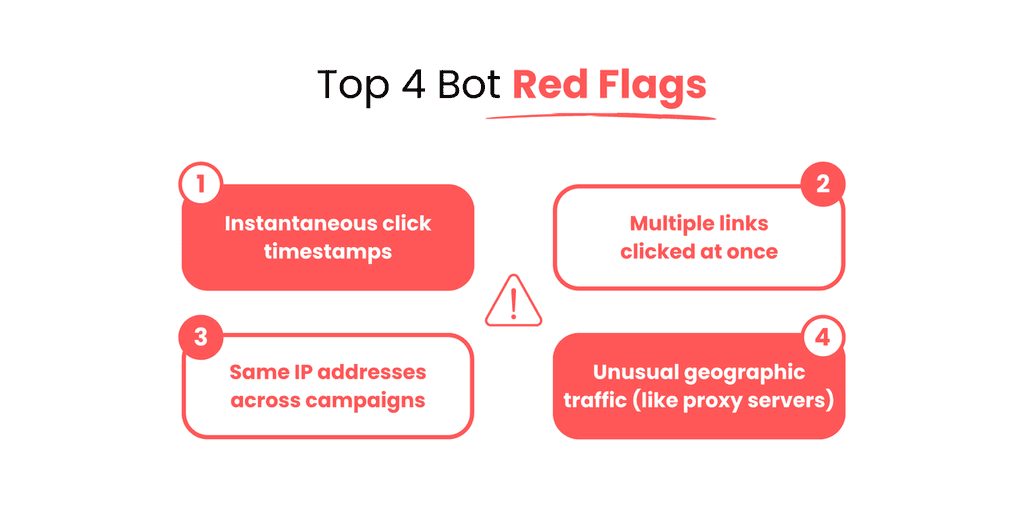
Bots behave in ways no human would. Here are the biggest red flags to watch for in your email analytics.
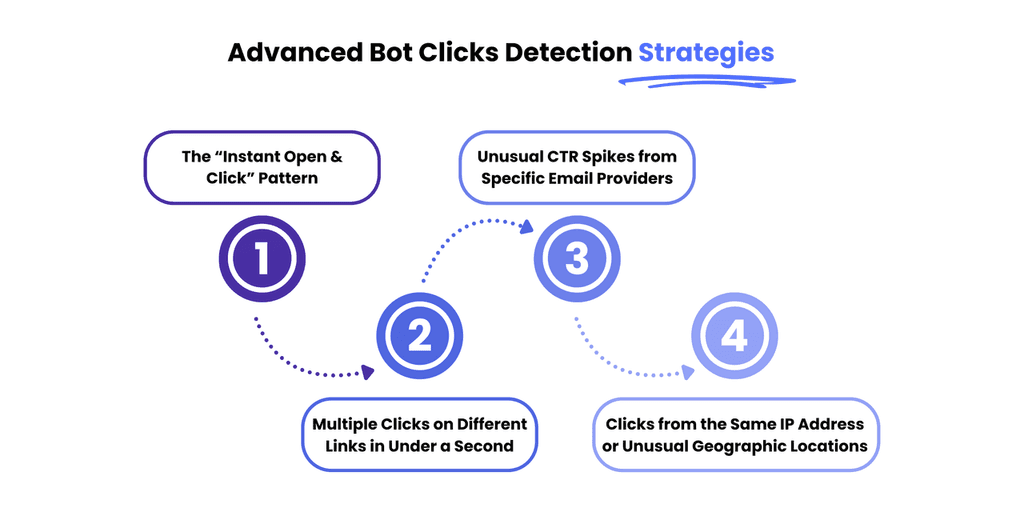
1. The “Instant Open & Click” Pattern
If an email is opened and clicked the second it lands in the recipient’s inbox, it’s almost certainly a bot.
What’s happening:
Corporate email servers and security applications scan incoming emails before the recipient sees them
These bots click every link to check for phishing attempts or malware
The actual subscriber hasn’t engaged yet
How to confirm it:
Click timestamps are almost identical to the open timestamp
The click happens immediately upon email delivery
It occurs frequently with corporate domains
Why this is a problem:
Bot-generated clicks inflate your click-through rates but aren’t real engagement
You might think a recipient is interested in your offer when security bots are just scanning your links
2. Multiple Clicks on Different Links in Under a Second
No human clicks every link in an email at the exact same time—but security bots do.
What’s happening:
Some email security bots test all links in an email at once to detect threats
These false clicks get recorded as engagement, even if no human ever interacted
How to confirm it:
Every link in the email is clicked at the exact same timestamp
Clicks happen before the recipient had time to read or engage
High click numbers but no conversions or replies
Why this is a problem:
Email campaign performance looks better than it actually is
Email service providers may prioritize false engagement, affecting future campaigns
3. Unusual CTR Spikes from Specific Email Providers
If your email metrics suddenly show a high number of clicks from a few specific domains but no conversions, bot activity is likely at play.
What’s happening:
Certain email service providers have security filters that pre-click every link
These bot clicks affect your real audience engagement, making it impossible to track actual interest
How to confirm it:
Click rates are abnormally high for specific domains, while others remain normal
High clicks but no conversions or meaningful interactions
Most clicks come from corporate email servers rather than consumer inboxes
Why this is a problem:
Retargeting efforts could be wasted on fake engagement
Email providers may flag your campaigns as suspicious due to unnatural engagement patterns
4. Clicks from the Same IP Address or Unusual Geographic Locations
Seeing multiple email engagement events from the same IP address? That’s a major red flag.
What’s happening:
Some corporate email servers process emails through a centralized security system, causing multiple recipients to register the same IP
Other email security bots use proxy servers, making clicks appear from unexpected geographic locations
How to confirm it:
Repeated clicks from the same IP address across multiple campaigns
Clicks originating from locations that don’t match your subscriber base
An unusual number of clicks from a single link within a short timeframe
Why this is a problem:
Email analytics become unreliable if multiple users register as the same engagement event
Lead scoring models may count bot clicks as high-intent interactions when they aren’t
The 3-Step Process to Confirm Bot Clicks
Now that we know what bot activity looks like, it’s time to separate real engagement from fake clicks. If you're relying solely on your email service provider’s analytics, you might be missing the full picture.
Bots leave traces, and if you follow the right steps, you can pinpoint bot-generated clicks before they mess up your email campaign performance.
Here’s a three-step process to confirm bot clicks and clean up your email engagement data.
1. Cross-check ESP Analytics with Website Tracking Tools
Most email service providers track open rates and click-through rates, but they don’t always tell you who actually engaged versus who triggered automated bot filtering. That’s where tools like Google Analytics and UTM parameters come in.
What to do:
Use UTM tracking on all links in emails to see real user engagement in Google Analytics
Compare ESP click data with website session data—if your ESP shows hundreds of clicks, but Google Analytics shows little to no traffic, that’s a bot problem
Look for bounce rates of 100%—bots click links but don’t stay on the page
Signs of bot clicks:
ESP shows high click-through rates, but Google Analytics doesn’t reflect real visits
Clicks don’t result in any meaningful engagement, like scrolling, button clicks, or time spent on the page
Many clicks originate from corporate email servers but never turn into conversions
Why this matters:
If your email analytics say your campaign is crushing it, but website data doesn’t match, bots are likely inflating your email metrics
Identifying bot traffic helps you adjust retargeting efforts and stop wasting budget on fake engagement
2. Identify Traffic Sources and Device/User Agent Inconsistencies
Not all email clicks come from real users. Bots often use generic user agents and route traffic through corporate email security systems, creating strange patterns in your click data.
What to do:
Check traffic sources in your Google Analytics reports—real users will come from a mix of locations, while bots often originate from the same IP addresses or corporate servers
Look at device data—if most clicks come from data centers, proxy servers, or unknown devices, it’s likely bot activity
Review user agent strings—if you see a high volume of clicks from email security bots (e.g., Barracuda, Mimecast, Proofpoint), those aren’t real subscribers engaging
Signs of bot clicks:
A large number of clicks from the same IP address or corporate email security gateways
Unusual traffic patterns—high click volume from one or two email providers, but no similar engagement from other subscribers
User agents showing automated security systems instead of browsers or mobile devices
Why this matters:
If most clicks come from email security applications instead of real users, your email campaign statistic inflation is a problem
Tracking traffic sources helps ensure real user engagement is driving your marketing decisions—not automated bot filtering
3. Reverse Engineer Click Timestamps to Detect Bot-Like Behavior
Timing is everything. Bots don’t behave like humans—they scan emails and click links at speeds no real person could match.
What to do:
Review email engagement timestamps—real users open emails at different times, but bot-generated clicks often happen within milliseconds of delivery
Look for instantaneous engagement patterns—if an email lands in a subscriber’s inbox at 10:00:00 AM and gets a click at 10:00:01 AM, that’s not a person, it’s a bot
Check if every link in the email is clicked at the exact same time—security bots often scan all links simultaneously
Signs of bot clicks:
Clicks happening within milliseconds of email delivery
All links being clicked at the exact same timestamp
No additional behavioral engagement (e.g., scrolling, form submissions, or time spent on a landing page)
Why this matters:
If your email data shows impossibly fast engagement, your click-through rates are being inflated by non-human interactions
By identifying bot-like click timestamps, you can remove false engagement data and make accurate campaign decisions
Also read: 10 Email Marketing Blogs Every Marketer Should Follow in 2025
How GoCustomer Comes to the Rescue
By now, it’s clear—bot clicks are distorting email engagement metrics, making it nearly impossible to tell who’s actually interacting with your emails. And if you’re making decisions based on bad data, your email marketing strategy is bound to suffer.
GoCustomer helps solve this by ensuring that your emails not only reach real people but also connect with them in a meaningful way—without interference from security bots or fake engagement.
Fixing the Scalability Problem in Hyper-Personalized Outreach
One of the biggest challenges in email marketing is scaling personalization without losing quality. Generic mass emails don’t work, but manually personalizing each message isn’t realistic either.
GoCustomer solves this by:
Aggregating and enriching data from multiple sources (LinkedIn, company websites, and more)
Using AI-powered agents to pull relevant insights and tailor messaging for each recipient
Adapting email sequences based on real engagement, not just opens or clicks that might be triggered by bots
With real user data powering every email, GoCustomer helps marketers focus on actual engagement, rather than misleading bot-driven metrics.
Preventing Bot Clicks from Skewing Your Data
A major frustration with bot activity is that it inflates click-through rates without driving real conversions. GoCustomer’s approach helps cut through the noise:
Bypassing unnecessary triggers that often activate corporate email security bots
Tracking engagement beyond clicks, focusing on meaningful actions like replies and website interactions
Filtering out fake engagement, so retargeting efforts aren’t wasted on recipients who never actually saw the email
This means cleaner data, better audience insights, and smarter campaign decisions—no more chasing fake engagement.
Ensuring Maximum Inbox Reach with Email Warm-Up
Even if your emails are bot-free, they won’t be effective if they’re landing in spam. GoCustomer includes domain warm-up, which:
Gradually builds sender reputation by mimicking organic email patterns
Reduces the risk of emails being flagged by ISPs
Helps ensure that real recipients—not just security filters—see your message
With a combination of hyper-personalization, smart data filtering, and email warm-up, GoCustomer helps marketers focus on what matters: getting real engagement from real people—without interference from security bots or inflated click data.

Reach more customers with your cold emails
Table of Contents
In a nutshell
Email bot clicks occur when automated programs, such as security filters or spam checkers, click on links within emails to scan for malicious content, rather than a human recipient engaging with the email.
Look for patterns such as multiple link clicks occurring simultaneously or clicks from unusual IP addresses or geographic locations.
Yes, inflated engagement metrics from bot clicks can lead to misinterpretations by Internet Service Providers (ISPs), potentially harming your sender reputation and deliverability rates.
Bot clicks can trigger automated follow-ups or move contacts through workflows prematurely, leading to irrelevant messaging and potential subscriber frustration.
Bot clicks can distort A/B testing outcomes by inflating engagement metrics, leading to inaccurate conclusions about the performance of different email variations.
Subscribe to our Newsletter!
Digital advice costs money but we send it to
your inbox for free.
Related Blogs
Time is Money, and We're About to Save You Both!
Book a quick demo of our email marketing tools and watch as we transform your leads into loyal customers.
![A loop illustration w-auto h-[70px]](/_next/image?url=%2F_next%2Fstatic%2Fmedia%2Fvector1.7738e6de.png&w=256&q=75 "GoCustomer Platform Image")

Get in touch
Subscribe to our weekly Newsletter and receive updates via email.